
Rebalancing Alert: How to Set Up Allocation Targets and Notifications on DonkyCapital
In brief
- ▸Customisable alerts: set a target % and tolerance threshold for each asset or asset class
- ▸In-app and email notifications when your portfolio drifts from target
- ▸Dashboard widget: monitor the status of each position in real time
- ▸Capital Management integration: use alert targets directly when rebalancing
One of the most common mistakes self-directed investors make is discovering after the fact that their portfolio has drifted significantly from its target allocation. Perhaps equities have grown so much that they now represent 75% of the portfolio instead of the planned 60%, and you only notice the problem months later. The result: a risk profile very different from the one you chose, with no warning along the way.
The Rebalancing Alert system in DonkyCapital is designed to eliminate exactly this gap. You can configure targets and tolerance thresholds for each component of your portfolio, receive a notification as soon as something falls outside the range, monitor everything via a dedicated dashboard widget, and — with a single click — start rebalancing using the same targets set in the alert.
In this guide
- Why monitor drift from your target asset allocation
- How to configure the Rebalancing Alert
- How does "By Asset Class" compare to "By Individual Asset"?
- The monitoring widget on the dashboard
- How to receive notifications (in-app and email)
- Integrating the alert with Capital Management for rebalancing
- Frequently asked questions
1. Why Should You Monitor Drift from Your Target Asset Allocation?
When you build a portfolio, you choose a target asset allocation: the percentage you want to dedicate to equities, bonds, commodities, and so on. That split is not arbitrary — it reflects your risk tolerance, time horizon, and financial goals.
The problem is that markets move. If equities grow 20% in a year while bonds stay flat, the weight of equities in your portfolio increases automatically, changing your risk profile without any action on your part. Academic studies on portfolio drift show that even small deviations, if left uncorrected, tend to compound over time — increasing volatility and correlation with equity markets, precisely when you would want more protection.
Monitoring portfolio drift is not something you do once a year. With automatic alerts, you can be notified at the exact moment you need to act — not afterwards.
2. How to Configure the Rebalancing Alert
To open the configuration panel, go to your portfolio in DonkyCapital and look for the bell icon (🔔), or navigate to the Rebalancing Alert section from the portfolio menu. A modal panel opens with all the configuration options.
First, make sure the Alerts active toggle is enabled: this activates the notification system. Then choose your preferred monitoring mode and set targets for each component.
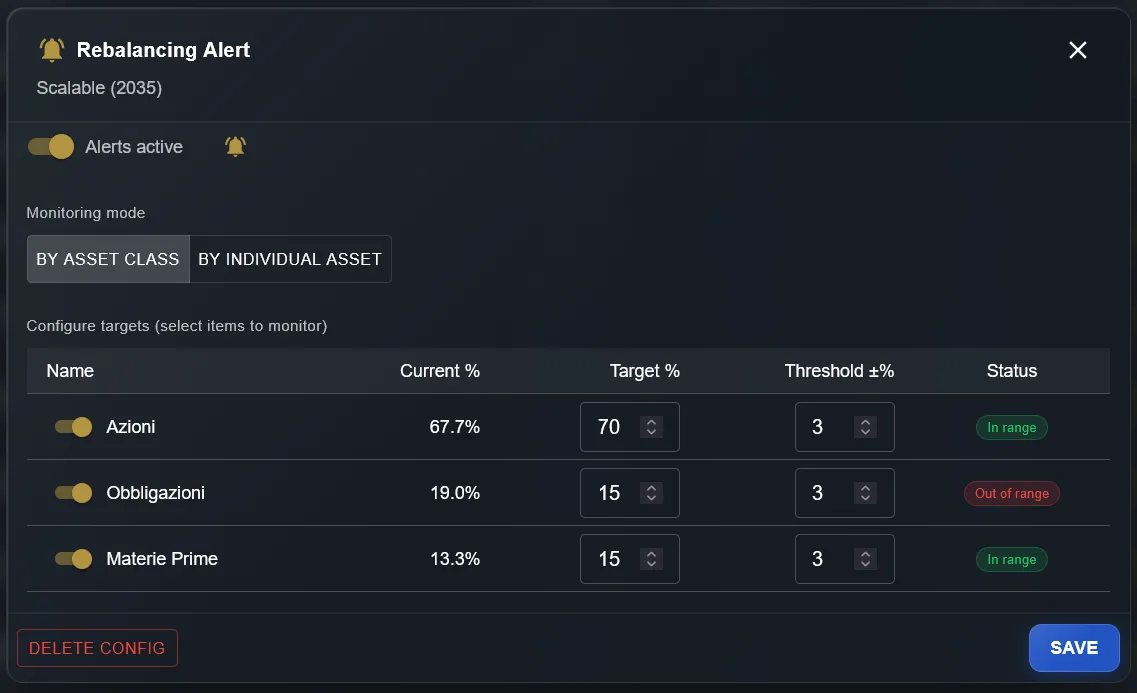
By Asset Class
Monitors the macro-categories of your portfolio: Equities, Bonds, Commodities, Cash. Ideal if you want high-level control without going into detail on individual instruments.
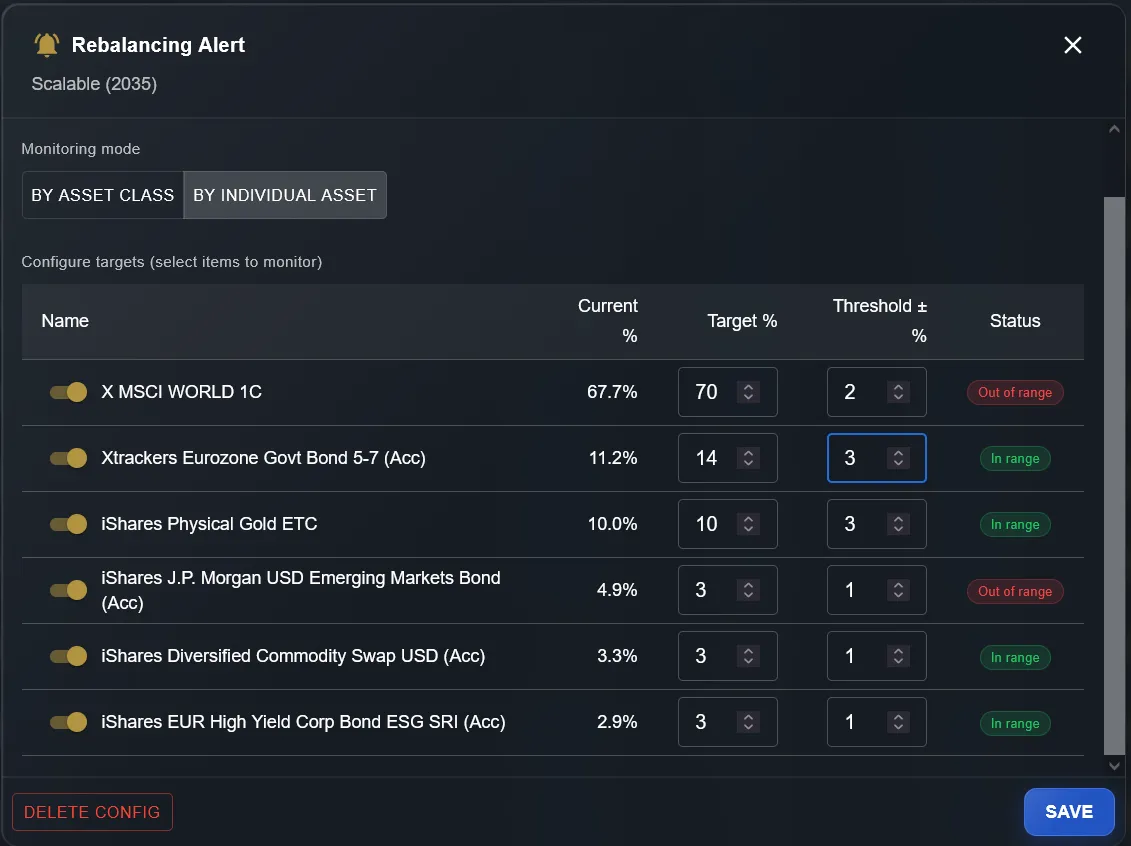
By Individual Asset
Monitors each individual ETF, stock, or instrument in the portfolio. Perfect for portfolios with a well-defined composition where you want to track every position.
3. How Does "By Asset Class" Compare to "By Individual Asset"?
The two modes are not mutually exclusive — you can use whichever suits your management style. By Asset Class mode automatically aggregates all instruments in the same category (all equities together, all bonds together, etc.) and tells you whether the macro-allocation is in line with your plan. It is the right choice for investors who want a high-level view without worrying about the movements of individual ETFs.
By Individual Asset mode is designed for investors with a precise portfolio composition — for example a lazy portfolio with 5–6 fixed-weight ETFs. Here you can monitor each individual instrument and know exactly which ETF has drifted from its target weight. As shown in the screenshot, you can enable monitoring for only some assets (toggle per row), ignoring minor positions or those where some volatility is acceptable.
4. What Does the Monitoring Widget on the Dashboard Show?
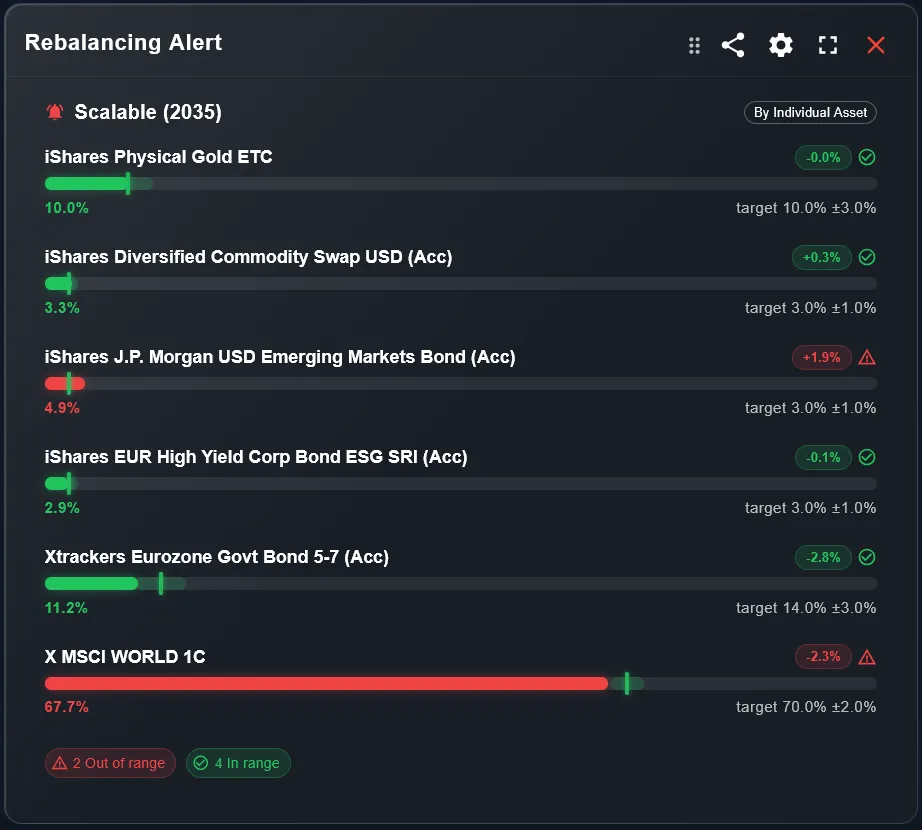
After configuring the alert, you can add the Rebalancing Alert widget to your dashboard. The widget shows, for each monitored asset, a visual bar indicating its position relative to the target range: green when in range, red when out of range.
Next to the bar you will find: the current portfolio percentage, the target with tolerance (e.g. "target 70% ±2%"), and the deviation in percentage points from the target (e.g. "−2.3%"). At the bottom of the widget there is an instant summary: how many positions are out of range and how many are on track.
- 1Go to the Dashboard and click "Add widget"
- 2Select "Rebalancing Alert" from the list of available widgets
- 3Choose the portfolio and display mode (By Asset Class or By Individual Asset)
- 4The widget updates automatically every time you open the dashboard
5. How Do You Receive Notifications (In-App and Email)?
When the percentage of an asset moves outside the defined range, DonkyCapital sends an in-app notification that appears in the application's notification centre. If you have enabled email notifications in your profile, you also receive a message in your inbox with details of which position went out of range and by how much.
Notifications are generated automatically every time portfolio data is updated. This means you do not need to check the dashboard manually every day: DonkyCapital does it for you, and only notifies you when something requires your attention. This is particularly useful for passive investors who prefer to act infrequently but precisely.
6. How Do You Integrate the Alert with Capital Management for Rebalancing?
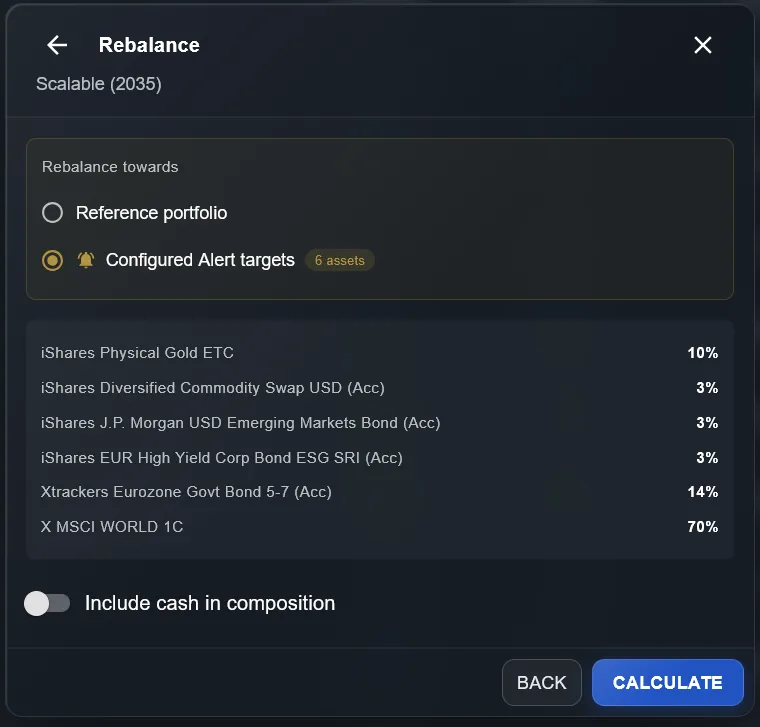
The most powerful feature of the alert system is its direct integration with Capital Management (DonkyCapital's rebalancing tool). When you start a rebalance, you can choose as your target not only the classic "Reference portfolio" but also the Configured Alert targets — that is, the target weights you have already set in the alert.
This gives you a single source of truth for your target asset allocation: configure it once in the alert, use it for daily monitoring, and use it again as the basis for rebalancing when the time comes. No need to enter weights twice or keep two separate configurations in sync.
- 1Access Capital Management from the portfolio menu
- 2In the target selection screen, choose "Configured Alert targets" instead of "Reference portfolio"
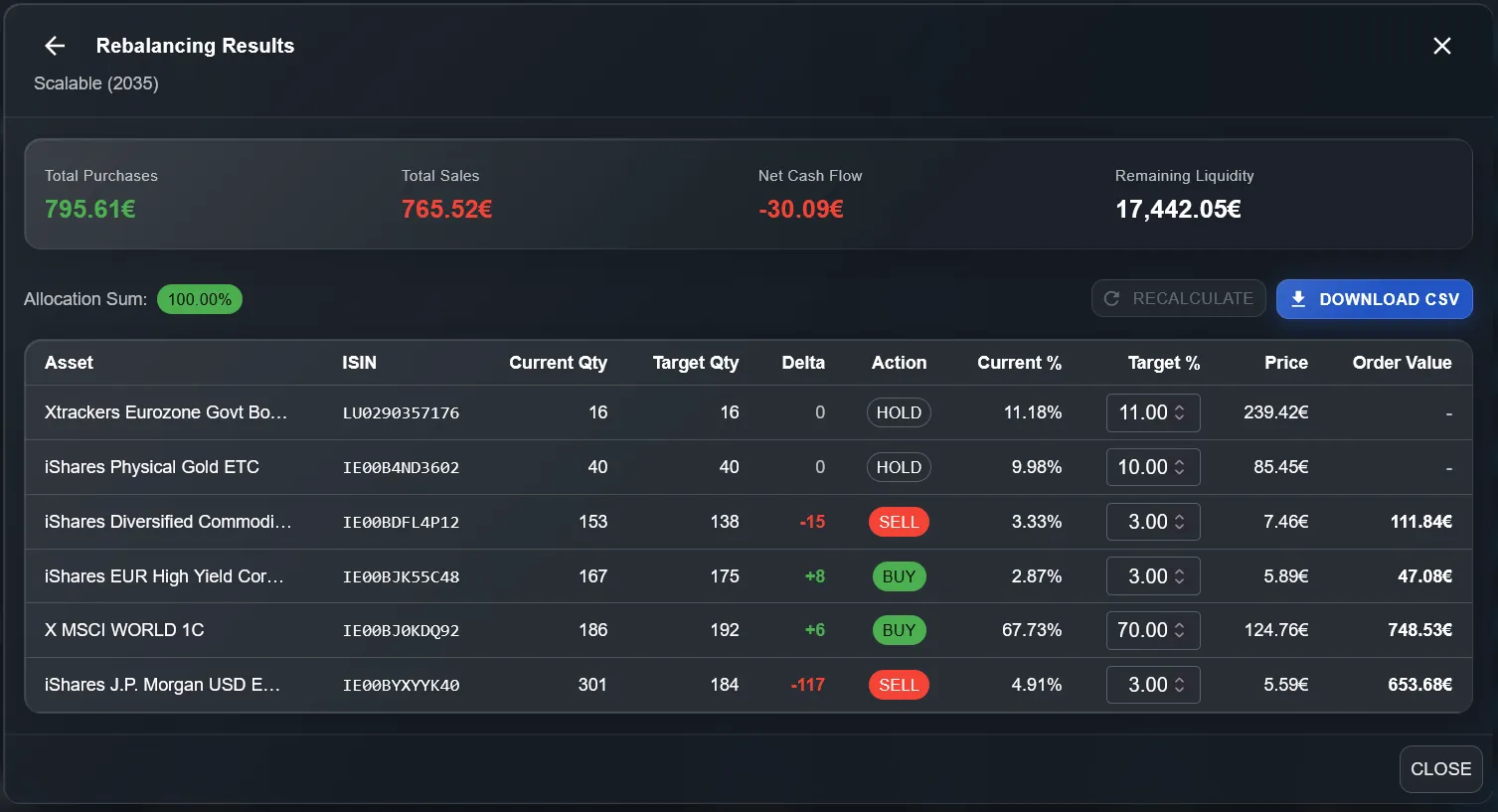
- 3The system shows the weights already configured in the alert; press "Calculate" to get the optimal order plan (BUY / SELL / HOLD with quantities and values)
7. When Should You Rebalance After an Alert?
Receiving an alert does not mean you must rebalance immediately. The decision depends on several factors: the size of the deviation, market conditions, availability of new cash, and the tax implications of selling. A good approach is to use the alert as a review trigger, not as an automatic execution order.
If you are in an accumulation phase and can direct new contributions towards underweight assets, buy-only rebalancing is often preferable: you bring the portfolio back to target without selling anything and without triggering taxable gains. If the deviation is large and additional cash is insufficient, Capital Management will calculate the optimal buy and sell orders to minimise the number of transactions needed.
Frequently asked questions
How many thresholds can I configure for the same portfolio?
You can configure an alert for every asset or asset class in the portfolio, with different targets and thresholds for each one. There is no fixed limit on the number of positions that can be monitored.
Can I have different alerts for different portfolios?
Yes. Each portfolio has its own independent alert configuration. If you have an accumulation portfolio and an income portfolio, you can set different rules for each.
Does the alert work for asset classes that include instruments from different brokers?
Yes. DonkyCapital automatically aggregates all instruments of the same type, regardless of the broker they are held with. The asset class percentage considers the consolidated portfolio.
Can I use alert targets for rebalancing even if I chose "By Asset Class" mode?
The "Configured Alert targets" option in Capital Management works with both modes. With "By Asset Class" the rebalancing operates on macro-categories; with "By Individual Asset" it operates on individual instruments.
How often is the deviation from target checked?
Alert checks run automatically every day. If the portfolio exceeds the set threshold, you receive an in-app and email notification without having to open the app.
What happens if I disable the alert on a specific asset?
You can disable monitoring of a single asset using the toggle per row in the configuration panel. The asset is excluded from checks and notifications, but the configuration (target and threshold) is retained so you can re-enable it whenever you want.
Want to try the alert system?
Sign up for free and start monitoring your portfolio with automatic alerts, real-time widgets, and integrated rebalancing.
Start for free