New · Official launch

DonkyPilot: the copilot for your portfolio

Portfolio insight and hands-on help inside the app: ask, understand, create. Not a generic chatbot: an assistant that already knows your data.

DonkyPilot is informative and does not replace certified financial advice.

  • Reads your real data
  • Two modes in one
  • Widgets created on request
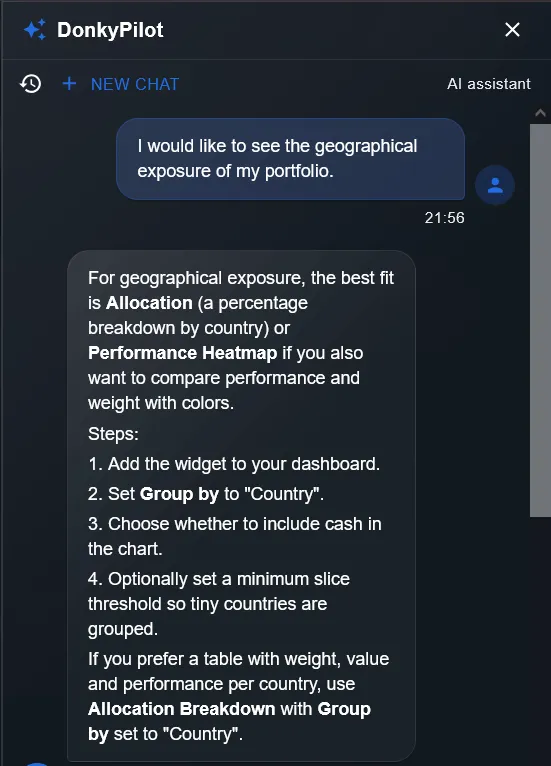
DonkyPilot chat panel in the DonkyCapital app, with a question about geographic exposure
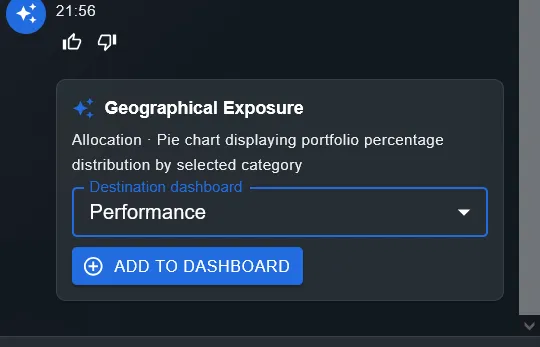
Geographic Allocation widget proposal created by DonkyPilot, with an Add to dashboard button

DonkyPilot

What DonkyPilot is

DonkyPilot is the contextual assistant that lives inside DonkyCapital. It knows what is in your portfolio, how your brokers are organised and where the features you need are. It answers in natural language, with no commands to learn.

1

Contextual, not generic

Every answer starts from your real portfolio: positions, transactions, dividends and fees.

2

Hands-on, not just theory

It guides you through wizards, explains filters and can suggest widgets to add to your dashboard.

3

Transparent

It tells you what it can do, what it cannot do, and when to talk to a professional.

Two modes, one copilot

DonkyPilot combines portfolio analysis with hands-on help. It picks the right mode based on your question.

Mode 1

Advisor

Reads your portfolio and helps you understand performance, risks and opportunities.

It is the evolution of AI Advisor: it answers on returns, risk, dividends, fees and realised P&L, citing your portfolios and positions.

Example

“How is my portfolio performing against the benchmark?”
Mode 2

App help

Guides you through wizards, explains filters and creates the widgets you need.

Contextual help on app features: imports, views, filters and dashboards. It can propose a widget and create it for you after confirmation.

Example

“Create a widget with allocation by country.”

What it can do

An assistant with access to the right data, no invented numbers.

Reads transactions and positions

Retrieves purchases, sales, cash movements and open positions from your portfolios.

Analyses dividends and fees

Answers on dividends received and costs paid, with a breakdown by broker and period.

Explains wizards

Walks you through file imports and view configuration step by step.

Suggests and creates widgets

Recommends the most suitable widget and adds it to your dashboard only after confirmation.

Respects context

Uses only your account data and keeps the conversation tied to your portfolio.

Collects feedback

You can flag an unclear answer or a failed action directly from the chat.

Try asking…

Four concrete examples, drawn from the most common questions.

Fees

How much did I pay in fees in 2025?

I will open the 2025 fee summary with the breakdown by broker and trade.

Dividends

Which dividends did I receive this year?

Here are the dividends received in 2025, sorted by date and position.

Setup

How do I set up the country view?

Here are the steps: Dashboard → Widgets → Geographic allocation.

Widgets

Create a widget with allocation by country.

I can create the “Allocation by country” widget. Confirm?

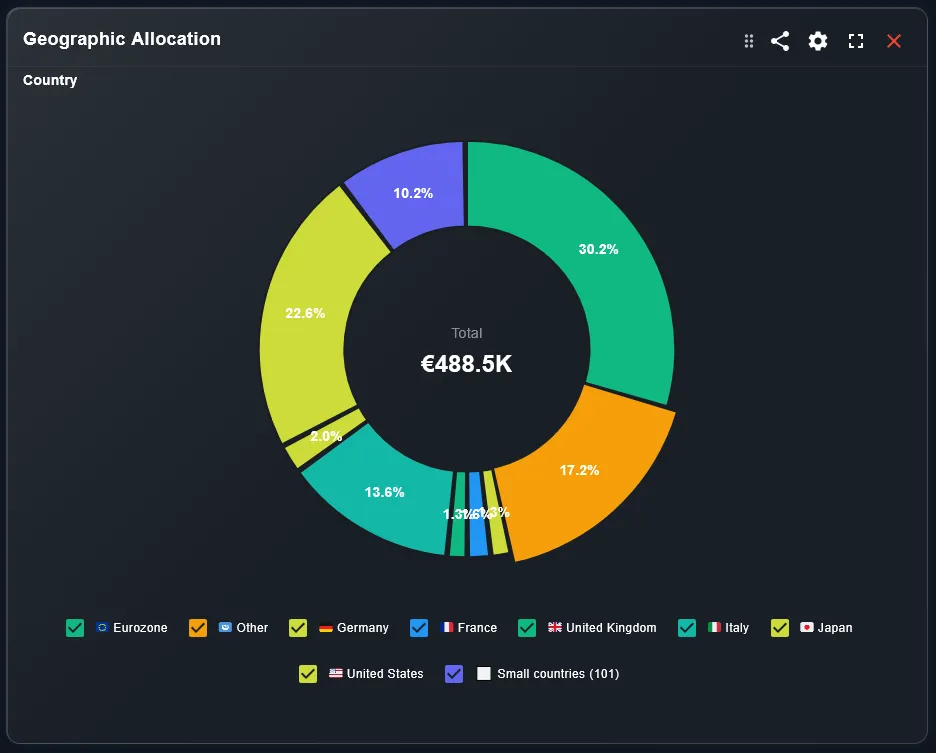
DonkyCapital Geographic Allocation widget with a donut chart by country

The widget it created: Geographic Allocation

DonkyPilot suggests the widget, explains how to configure it and adds it to your dashboard only after your confirmation.

  • Walks you through file imports and view configuration step by step.
  • Recommends the most suitable widget and adds it to your dashboard only after confirmation.
  • Uses only your account data and keeps the conversation tied to your portfolio.

Privacy and security

DonkyPilot works on your data, with clear limits.

DonkyPilot does not provide certified financial advice and does not execute investment transactions.

  • Your data only: answers use the context of your account.
  • No data shared with other users.
  • Token limits and caps keep responses fast and controlled.
  • Feedback is collected to improve quality and reliability.

Frequently asked questions

Is DonkyPilot a financial adviser?

No. It is an informative assistant: it helps you read your data and use the app, but does not provide certified financial advice.

What is the difference between DonkyPilot and AI Advisor?

AI Advisor is now the Advisor mode of DonkyPilot. DonkyPilot adds App help: operational guidance, wizard explanations and widget creation.

What data does it use?

Only your account data: portfolios, positions, transactions, dividends and fees. It does not use other users’ data.

Can it change my portfolio?

No. It can propose a widget and create it only after your confirmation. It does not place orders or edit transactions.

Which languages are available?

DonkyPilot is available in Italian, English, German, French, Spanish, Portuguese and Dutch.

How much does it cost?

DonkyPilot is included in DonkyCapital. Usage limits depend on your plan.

Ask your portfolio the next question

Create your account and meet DonkyPilot inside the app.

Informative, not certified financial advice.