
DEGIRO Portfolio Tracker: How to Import Your DEGIRO Portfolio to DonkyCapital
If you use Degiro to invest in ETFs, stocks, or mutual funds, you can now easily track all your operations with DonkyCapital. In this complete guide, I'll explain how to export your Degiro portfolio directly from the platform (no extensions needed) and how to import it into DonkyCapital, the portfolio tracker that lets you manage all your investments in a single advanced dashboard.
DEGIRO is one of Italy's most innovative banks, with a complete trading platform and competitive commissions.

Why Export Your Attività from DEGIRO
Exporting data from Degiro is simple and straightforward: no extensions or third-party tools needed. Just access the Attività section and download the CSV file with all your transactions.
- Easily export all operations in CSV format directly from Degiro;
- Keep all data on your device, without sharing login credentials;
- Import files into DonkyCapital for advanced analysis;
- Get detailed reports on asset allocation, performance, and risk.
With DonkyCapital, you transform DEGIRO's raw data into strategic insights to optimize your portfolio.
Learn more about Degiro features.
Why Use DonkyCapital Instead of DEGIRO's Platform
Degiro's platform provides transaction history and basic reporting. However, it doesn't offer advanced analysis such as:
- Customizable dashboards with your preferred KPIs;
- Detailed analysis of sector and geographic exposure;
- Multi-portfolio comparison if you have investments across multiple platforms;
- Automatic calculation of time-weighted and money-weighted performance;
- Alerts and notifications on rebalancing and asset allocation.
With DonkyCapital, you centralize all your investments (Degiro, Degiro, Scalable Capital, Moneyfarm, etc.) in a single professional dashboard.
DonkyCapital gives you total control of your wealth, with analysis that DEGIRO doesn't provide natively.
Step 1 — Access DEGIRO and Go to the Attività Section
- Log in to the Degiro platform with your credentials;
- From the home page, go to the "Attività" section;
- Click on "Attività";
- Select "Account".
Tip: Export your entire transaction history for complete analysis in DonkyCapital.
Step 2 — Export the CSV File (CSV)
- On the "Account" page, select the reference period (recommended: from inception to date);
- Click the "Export to CSV" or "Download" button;
- The
.csvfile will be downloaded to your computer; - Save the file in an easily accessible folder.
The CSV file contains all information about your operations: date, instrument, quantity, price, fees, and total amount.
DEGIRO allows direct export without the need for browser extensions or third-party tools.
Step 3 — Import the File into DonkyCapital
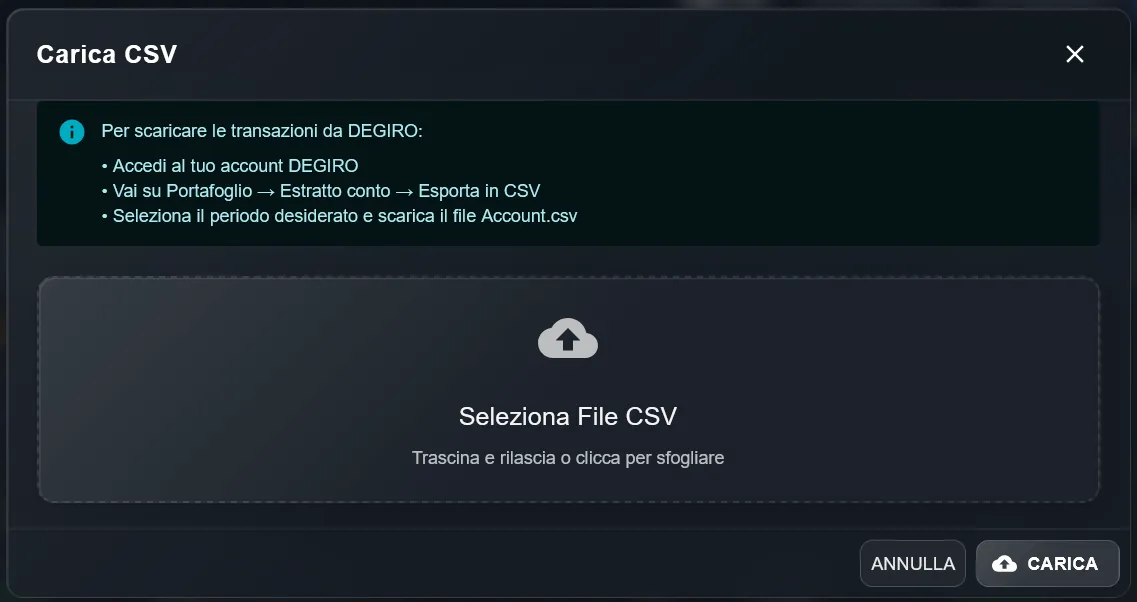
- Log in to DonkyCapital.com and open your account;
- Select the portfolio to import data into;
- Click "Import Transactions";
- Upload the
.csvfile exported from Degiro; - Confirm the import and wait for processing (a few seconds).
In a few seconds, all your <a href="https://www.degiro.com/" target="_blank" rel="noopener noreferrer nofollow" class="text-primary hover:underline">Degiro</a> transactions will be visible in the DonkyCapital dashboard, with detailed reports on:
- Attività composition by asset class;
- Time-weighted and money-weighted performance;
- Sector and geographic exposure;
- Balance and rebalancing analysis;
- Comparison with benchmarks and other portfolios.
This level of analysis is not natively available on DEGIRO, which focuses primarily on trading rather than strategic asset allocation.
Visit Degiro official website for more information about their platform.
Ready to take control of your investments?
2-minute setup. No commitment. Cancel anytime.
Get Started Free - No Card Required