
How to Track Unlisted Assets in Your Portfolio
Real estate, private equity, art, collectibles, startup shares, P2P loans: a significant part of your wealth may not be listed on any exchange. DonkyCapital lets you register and monitor these assets just like stocks and ETFs, giving you a complete and accurate picture of your total net worth.
In this guide, we walk through step by step how to add an unlisted asset, record transactions, update its price over time, and track income generated.
What are unlisted assets?
Unlisted assets are investments that do not have a real-time market price. Unlike stocks and ETFs, their value must be estimated and updated manually by the investor. In DonkyCapital, they are private assets: only you can see them.
Real Estate
Primary residence, vacation homes, rental properties, parking spaces, land
Private Equity
Startup shares, stakes in unlisted companies, PE fund units
Art & Collectibles
Paintings, sculptures, luxury watches, fine wines, classic cars
Loans & Credits
P2P loans, private bonds, receivables
Other
Self-custodied crypto, physical precious metals, royalties
Adding unlisted assets to your portfolio lets you calculate performance and allocation of your total wealth — not just the exchange-traded portion.
Step 1 — Create the unlisted asset
First, you need to register the asset in the "My Unlisted Assets" section. Each asset has a name, a custom symbol, a currency and — optionally — an ISIN code.
- 1Go to "My Unlisted Assets" from the main menu
- 2Click "+ ADD NEW ASSET"
- 3Enter a name (e.g. "RentHouse"), a unique symbol (e.g. "HOUSE001") and a currency (e.g. EUR)
- 4The ISIN field is optional: use it if the asset has one, otherwise leave it blank
- 5Confirm: the asset appears in the list and can be used in transactions
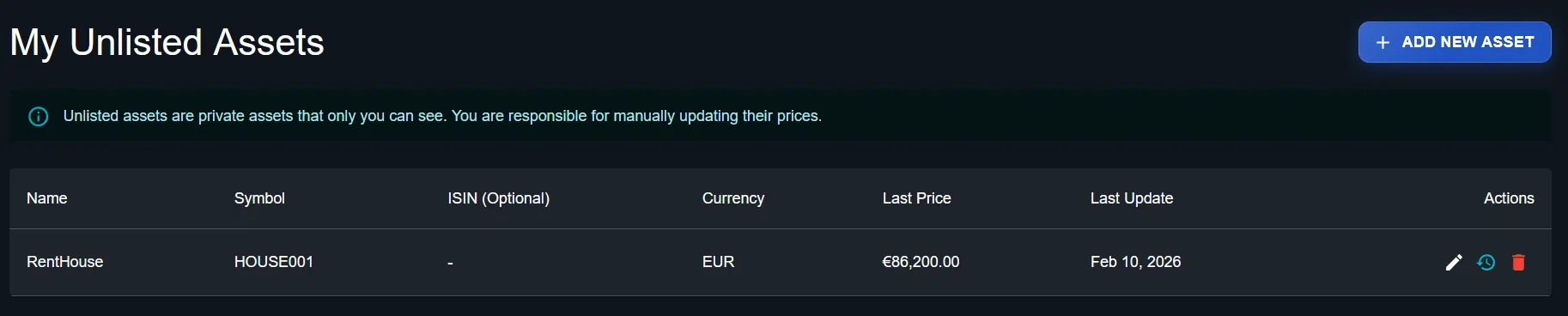
The My Unlisted Assets section shows all your private assets with their latest price and last update date.
💡 Tip
Choose a short, recognisable symbol (e.g. HOUSE001, STARTUPABC, PAINTING01). You'll use it to filter transactions later.
Step 2 — Record the purchase
Once the asset is created, record the buy transaction just as you would for any financial instrument. In the "Add Transaction" modal, select the "Unlisted" tab to see your private assets.
- 1Click "Add Transaction" from the portfolio where you want to add the asset
- 2Select type "Buy Asset"
- 3Select the "Unlisted" tab
- 4Search and select the asset from the list (e.g. "RentHouse (HOUSE001)")
- 5Enter the quantity (e.g. 1 for a property), the purchase price and the transaction date
- 6Add commissions or transaction costs if applicable
- 7Click "CREATE" to confirm
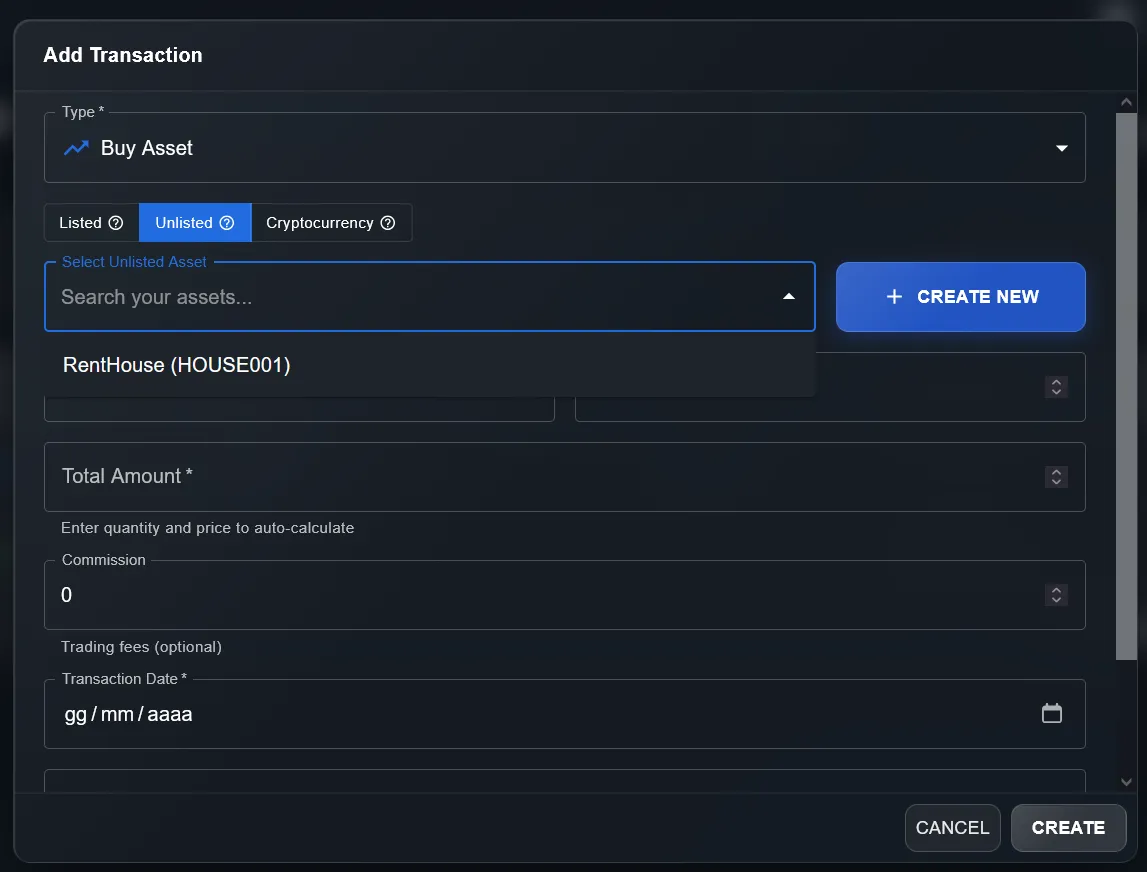
In the Add Transaction modal, the "Unlisted" tab lets you select your private assets. You can also create a new asset on the fly with "+ CREATE NEW".
Step 3 — Update the price over time
Unlisted assets do not have an automatic price feed: you decide when and how to update the valuation. DonkyCapital keeps a full history of every price update, so you can track how the value evolves over time.
- 1From the "My Unlisted Assets" list, click the clock icon (price history) next to the asset
- 2The "Price History" panel opens showing all previous updates
- 3Click "ADD NEW PRICE" to enter the updated valuation and date
- 4The new price automatically updates the market value of your portfolio
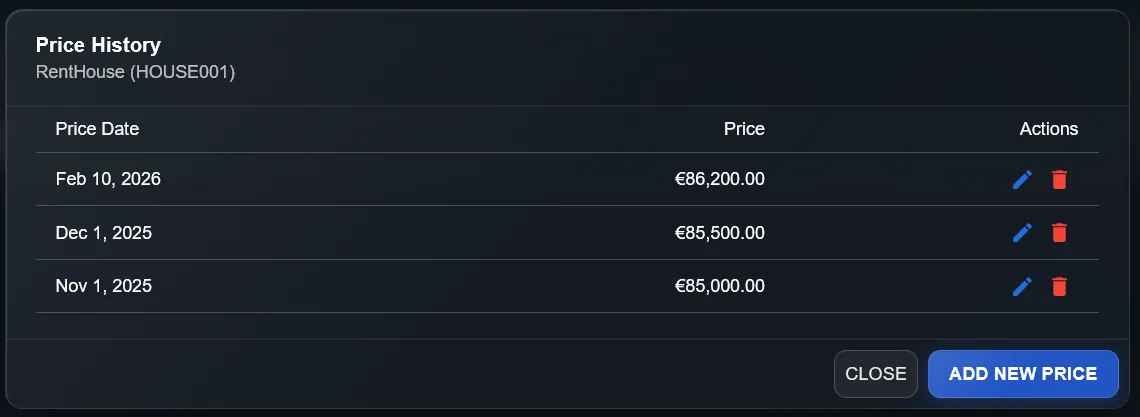
The Price History panel shows the evolution of the price over time. Update the valuation whenever you have a new estimate (appraisal, received offer, market benchmark).
💡 Tip
How often to update? For real estate: quarterly or semi-annually. For art/collectibles: annually or after significant events (auctions, comparable sales). For startups: after each funding round.
Step 4 — Record income (rent, dividends, interest)
An unlisted asset can generate periodic income: rental income, dividends from holdings, interest on loans. DonkyCapital lets you record this income as "Dividend" transactions, keeping complete accounting records.
- 1Add a new transaction to your portfolio
- 2Select type "Dividend"
- 3Choose the unlisted asset from the menu (e.g. "HOUSE001 - RentHouse")
- 4Enter the quantity of units that generated the income (e.g. 1)
- 5Enter the income per unit (e.g. 1000 for a €1,000 monthly rent)
- 6The total is auto-calculated: quantity × income per unit
- 7Enter the date and confirm
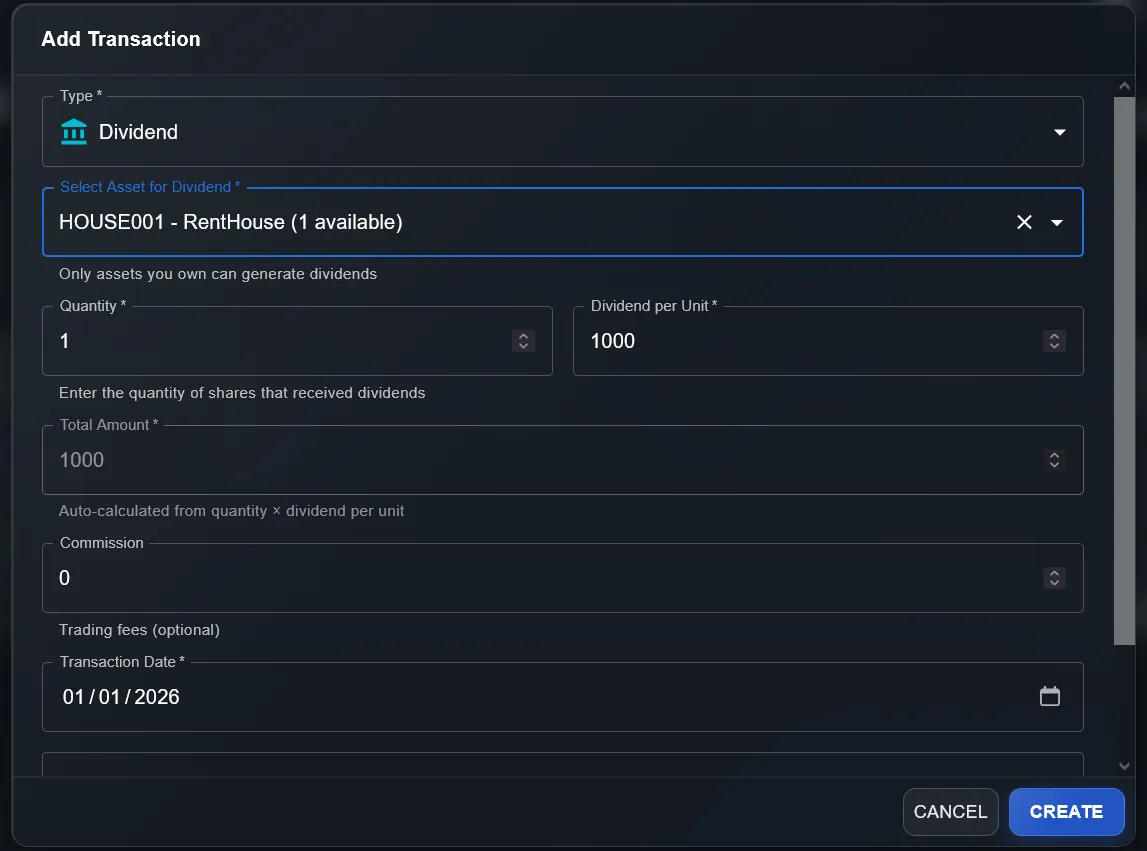
The "Dividend" transaction type lets you record any periodic income: rent, startup dividends, P2P interest. The total is calculated automatically.
- →Monthly rent from property: record each payment as a Dividend
- →Dividend from company stake: one transaction per distribution
- →P2P interest: record monthly or quarterly
- →Royalties: one transaction per payment received
The full picture: transactions and portfolio trend
Once transactions are entered, DonkyCapital integrates unlisted assets across the entire platform, exactly like listed ones. The Transactions section shows the complete accounting ledger, while the Portfolios Trend chart visualises total value over time.
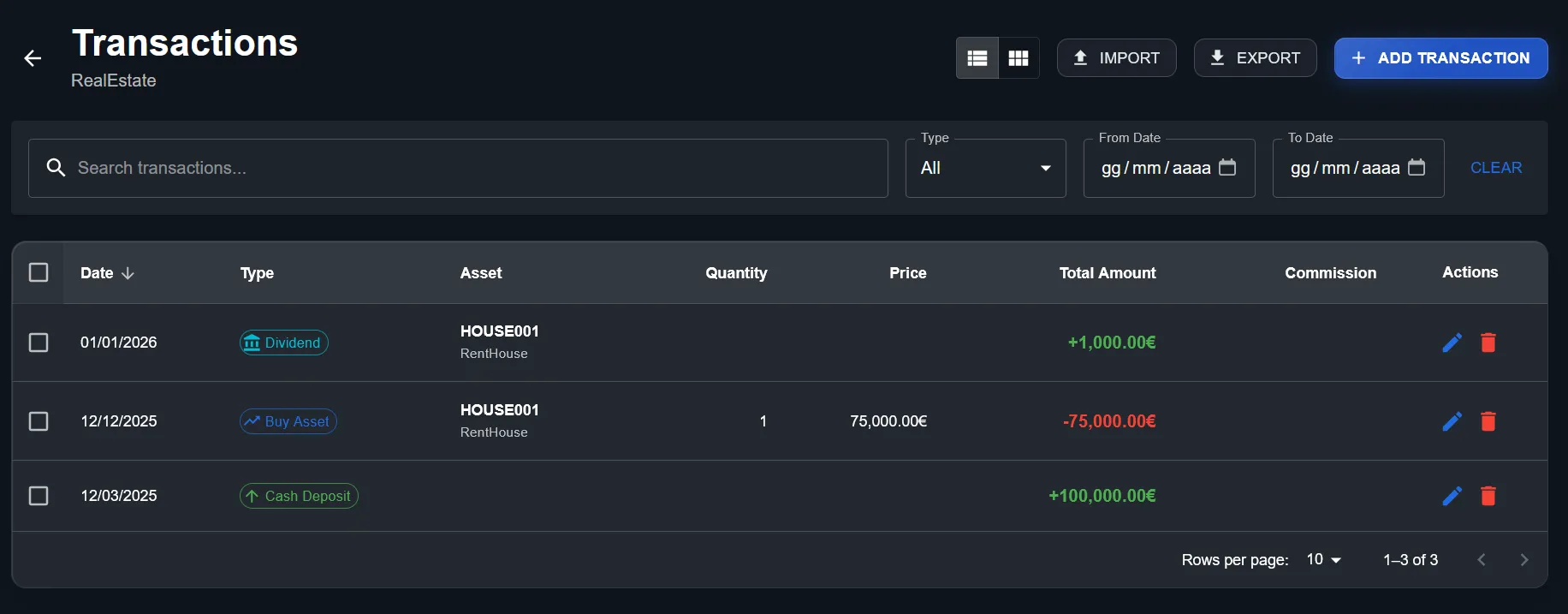
The Transactions section shows all operations in chronological order: the cash deposit, the property purchase and the rent collected.
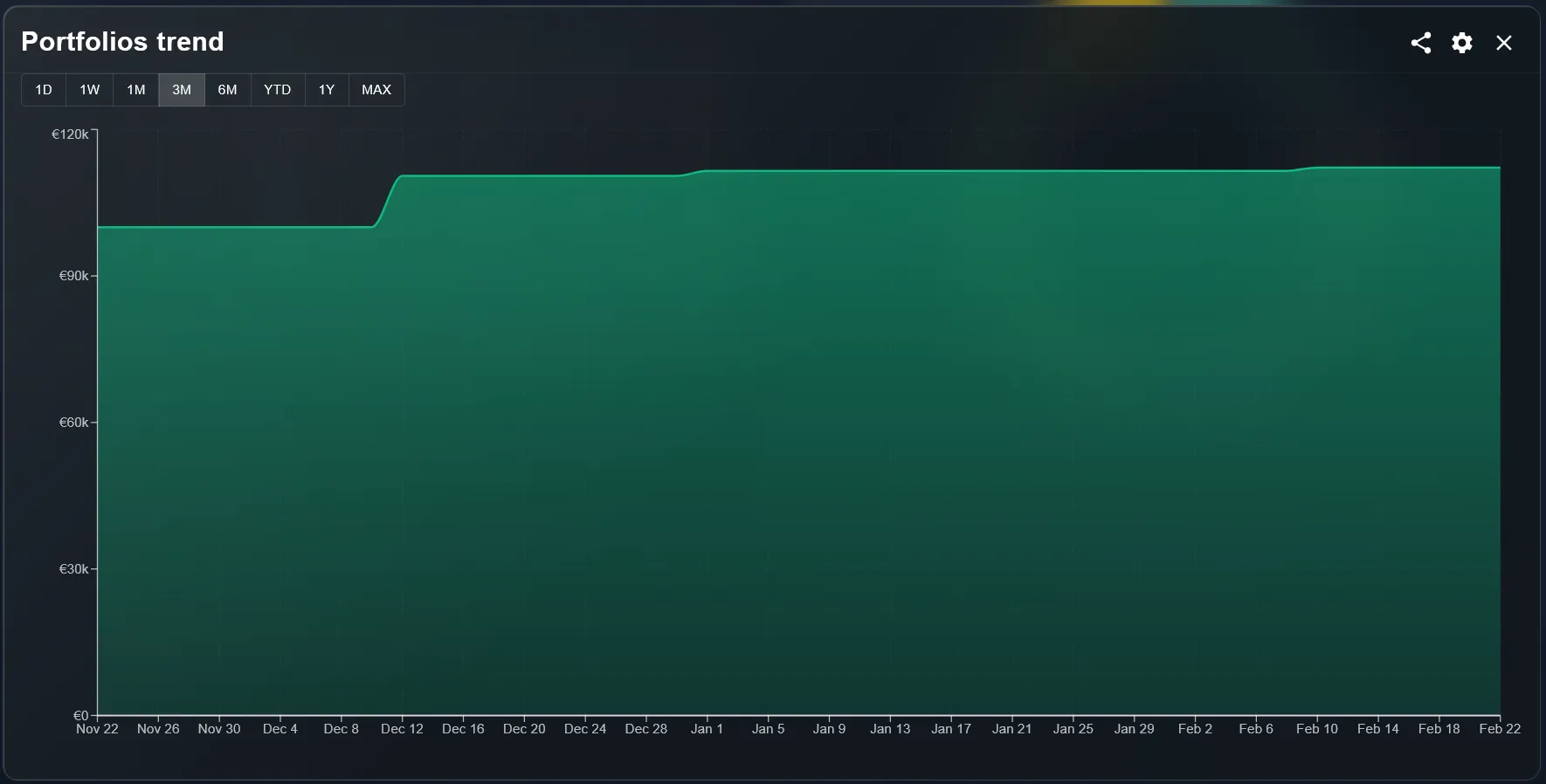
The Portfolios Trend chart includes the value of unlisted assets: the jumps in the chart correspond to the property purchase (December) and subsequent price updates.
The result is a truly complete portfolio: stocks, ETFs, crypto and unlisted assets all live in a single dashboard with consistent performance metrics.
Frequently Asked Questions
Can I use unlisted assets across multiple portfolios?+
How is performance calculated for unlisted assets?+
Do I need to update the price every time it changes?+
Can I import a historical price series?+
Do unlisted assets affect portfolio allocation?+
Start tracking your complete wealth
Don't leave real estate, private holdings and alternative investments off your radar. With DonkyCapital you can finally have a 360° view of your portfolio.
Try DonkyCapital