
How to Rebalance Your Investment Portfolio: Practical Guide & Automatic Tool
Portfolio rebalancing is one of the most important operations for any long-term investor, yet it is often overlooked. Markets do not all move in the same direction: stocks growing faster than bonds, a sector outperforming others, new capital contributions — all situations that over time alter the original portfolio composition and change the risk profile you had planned.
In this complete guide you will learn what rebalancing is, why it is essential, when to do it, and how to simplify it with the Capital Management feature built into DonkyCapital — no Excel spreadsheets, no manual calculations.
Table of Contents
What is portfolio rebalancing
Rebalancing consists of bringing the weights of a portfolio's assets back to their original or target composition. Imagine you planned a 60% equity and 40% bond allocation. After a year of stock market gains, the ratio has shifted to 72% stocks and 28% bonds: you are now taking on more risk than you had planned.
Rebalancing means correcting this drift: you sell part of the overexposed positions or buy the underweighted ones, until you return to the planned composition. The same principle applies to an ETF portfolio, a sector allocation, or a currency and geographic breakdown.
Rebalancing is not speculation — it is discipline. It is the mechanism that allows you to sell high and buy low in a systematic way, without relying on the emotion of the moment.
Why portfolios drift over time
Portfolio drift is inevitable and depends on several factors:
- ▸Differentiated asset growth: stocks and bonds do not grow at the same rate. In equity bull markets, stocks tend to outperform, altering their relative weight.
- ▸Uninvested dividends and coupons: if the generated cash is not redistributed proportionally, progressive imbalances accumulate.
- ▸New capital contributions: each monthly or lump-sum deposit, if not distributed correctly, alters the portfolio weights.
- ▸Partial withdrawals: capital reductions that do not respect the target composition modify the remaining proportions.
- ▸Currency effect: if you hold ETFs denominated in USD or GBP, EUR/currency fluctuations modify the real weight in your reference currency.
When to rebalance: the most effective strategies
There is no universal answer to "how often should I rebalance my portfolio?". It depends on your strategy, transaction costs, and tax impact. There are, however, three main approaches:
Calendar-based rebalancing
Choose a fixed frequency — quarterly, semi-annual, or annual — and check the portfolio composition regardless of market movements. It is simple to plan and helps maintain discipline by avoiding emotional decisions. The downside is that you might act when the drift is still minimal, incurring unnecessary transaction costs.
Threshold rebalancing
Act only when an asset deviates more than 5% (or 10%) from its target allocation. For example, if an equity ETF weighs 40% in the plan but has reached 47%, it is time to act. This approach reduces transaction costs during stable periods, but requires more frequent monitoring.
Mixed approach (recommended)
The most efficient strategy for most investors: quarterly review, but action only if the drift exceeds 5%. This avoids unnecessary transactions during stable periods, maintains time discipline, and ensures you do not notice a significant imbalance too late.
How to rebalance without excessive tax costs
Classic rebalancing involves selling winners and buying losers. However, any sale at a gain generates taxation on capital gains. There are alternative strategies to minimize the tax impact:
| Strategy | Advantage | Limitation |
|---|---|---|
| Buy-only rebalancing | No realized capital gains, fiscally optimal | Requires new liquidity, works only if drift is not too wide |
| Full rebalancing (buy & sell) | Brings back exactly to target composition | Generates taxable capital gains on positions sold at a profit |
| Withdrawal rebalancing | Ideal during the decumulation phase | Only applicable if you are withdrawing capital from the portfolio |
In all three cases, DonkyCapital's Capital Management function natively supports each strategy: you can choose to add capital, reduce it, or rebalance against a target composition.
DonkyCapital's Capital Management
DonkyCapital integrates directly into the portfolio tracker a Capital Management function that automatically calculates the orders needed to rebalance or redistribute capital — in seconds, with up-to-date market prices, without formulas and without Excel.
The function is available for all portfolios loaded on the platform, regardless of the broker (Fineco, DeGiro, Scalable Capital, Directa and others).
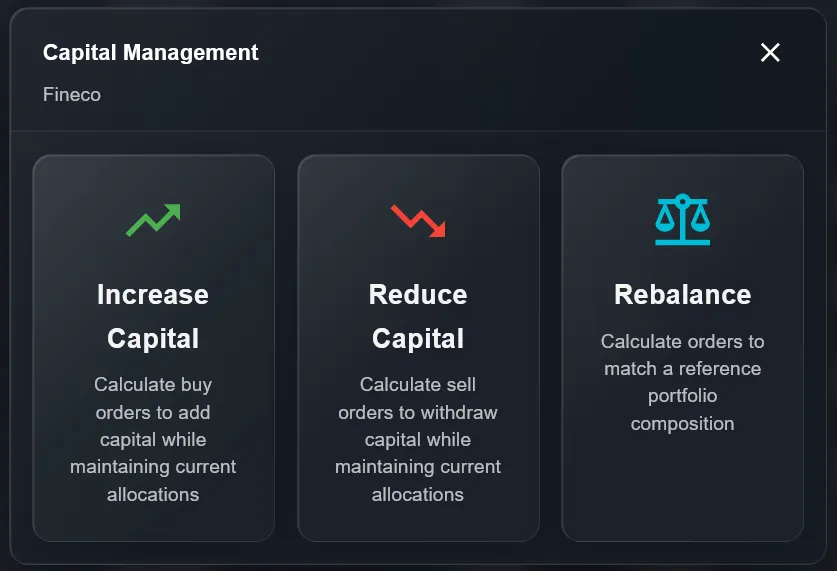
Increase Capital
Calculates buy orders to add new liquidity while maintaining current allocations.
Reduce Capital
Calculates sell orders to withdraw capital while keeping proportions unchanged.
Rebalance
Calculates buys and sells to bring the portfolio to the composition of a reference portfolio.
Step-by-step tutorial
01.Increase Capital — add liquidity without unbalancing
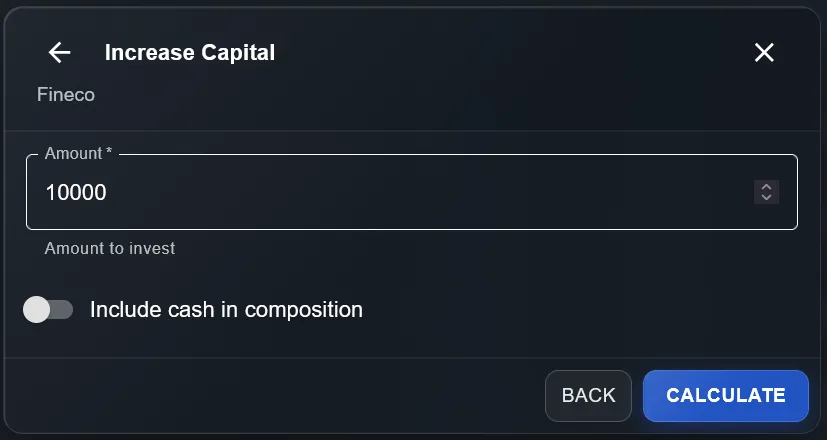
Do you have new liquidity to invest and want to distribute it proportionally across existing positions? Select Increase Capital, enter the available amount (e.g. €10,000) and press Calculate.
The system processes current market prices and returns the optimal purchase plan: for each instrument in the portfolio you will see the current quantity, target quantity, delta (shares to buy) and the order value. Remaining liquidity after purchases is visible in real time.
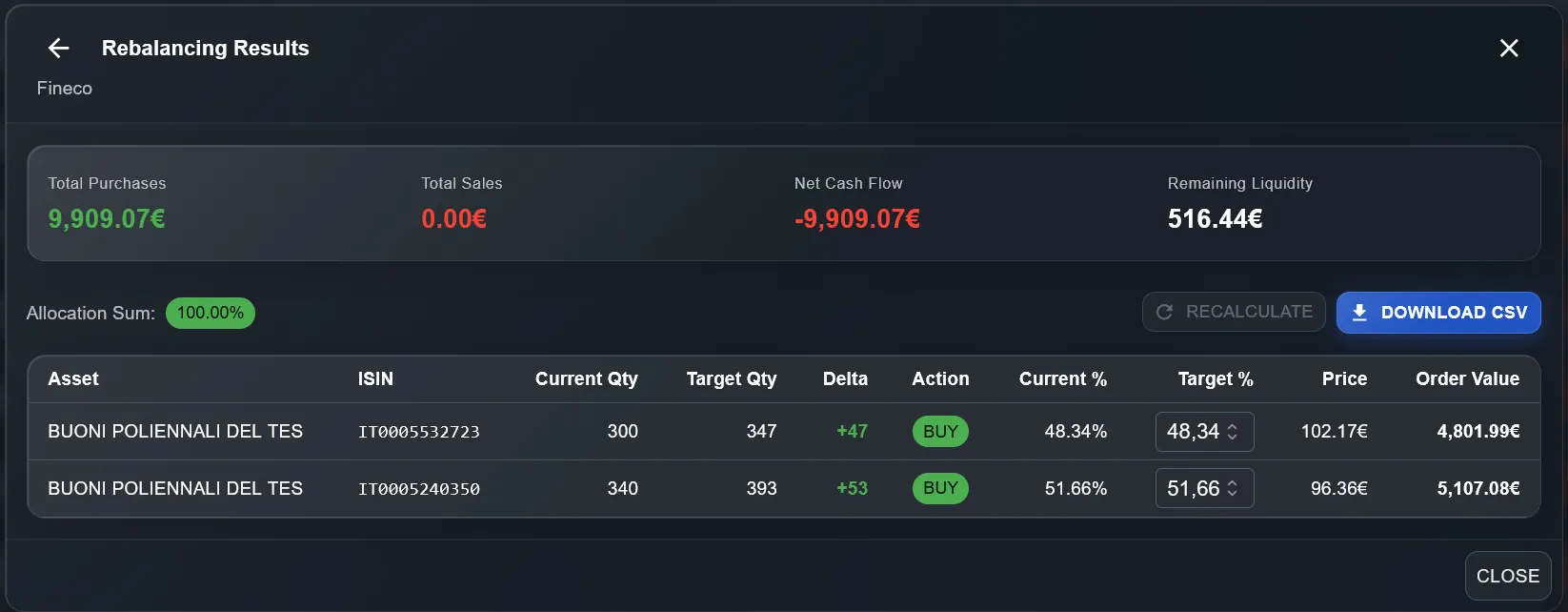
You can download the results in CSV format to place orders directly on your broker's platform.
02.Reduce Capital — withdraw without unbalancing
Do you need to liquidate part of your portfolio? With Reduce Capital enter the amount to withdraw and the system calculates which securities to sell and in what quantity, keeping the proportions of the remaining portfolio unchanged.
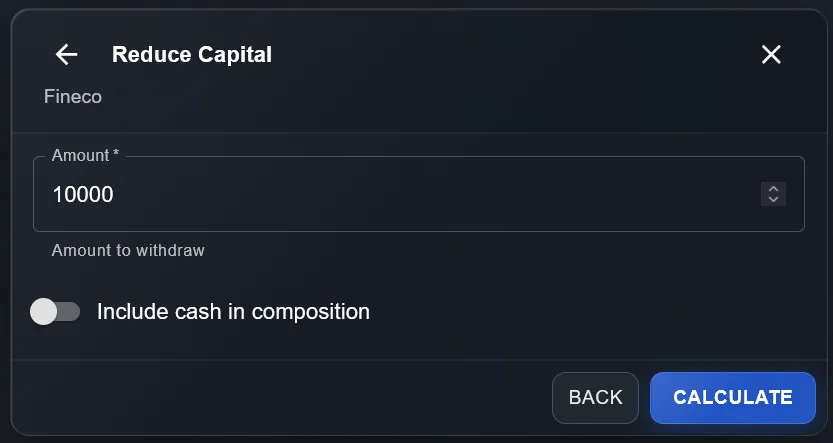
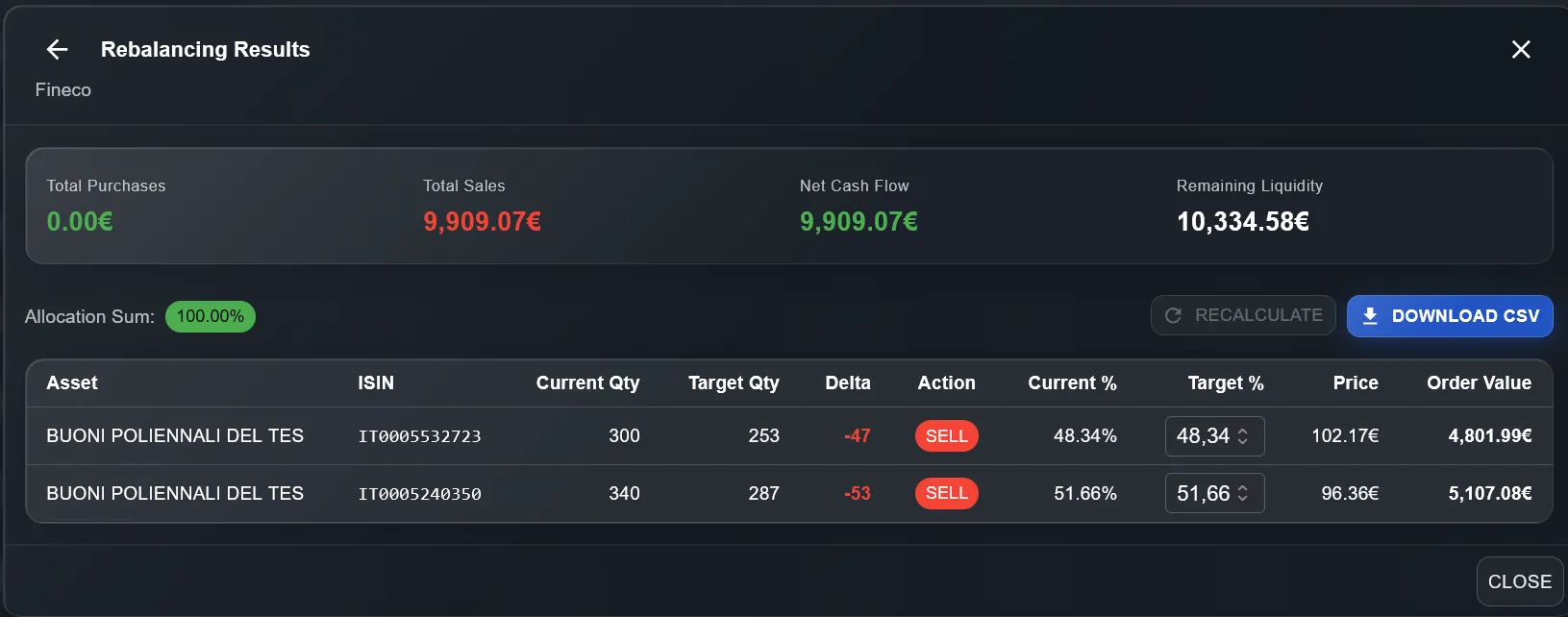
The result shows sell orders (SELL) with exact quantities and values for each instrument, plus available liquidity after the sales. Especially useful during the decumulation phase or when you need to cover unexpected expenses.
03.Rebalance — return to target composition
This is the most powerful mode. Select the reference portfolio — which can be the same portfolio at a previous date, or a completely different portfolio as a model target — and the reference date: DonkyCapital will calculate exactly how many securities to buy, sell, or hold (HOLD) to bring the current portfolio to the desired composition.
This is particularly useful if you manage multiple portfolios: you can align a satellite portfolio to the composition of a main portfolio, or replicate the structure of a model portfolio on a new broker account.
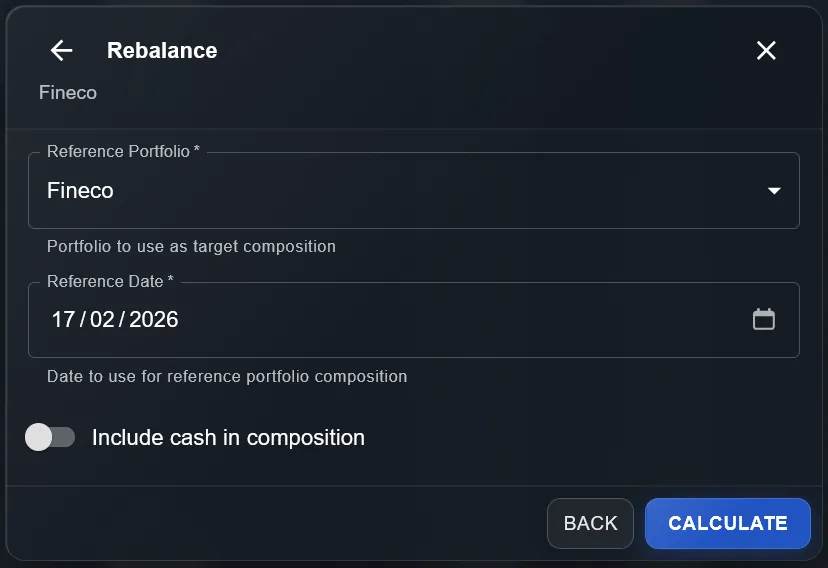
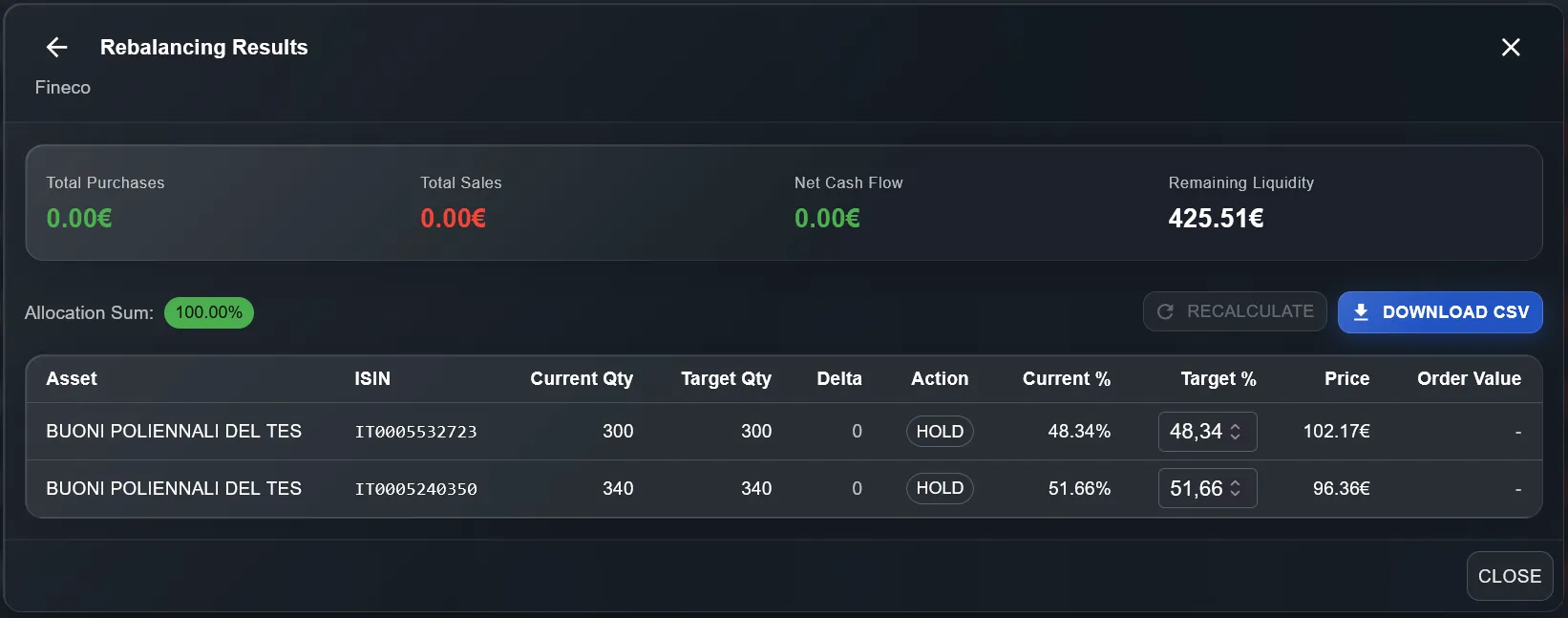
If the portfolio is already aligned to the target composition, the result will show all instruments with action HOLD and zero buy/sell amounts. You can also manually modify the target percentages directly in the results table and press Recalculate to update the plan in real time — without having to start over. This gives you maximum flexibility to test different scenarios and optimize the distribution before executing any order.
Frequently asked questions about rebalancing
How often should I rebalance my portfolio?
For most investors, a quarterly review is sufficient. The important thing is to define a drift threshold (e.g. ±5%) beyond which to act. Rebalancing too often increases transaction costs and can generate taxable capital gains unnecessarily.
Is it better to rebalance only by buying or also by selling?
It depends on your investment phase. If you are in accumulation and have new liquidity available, buy-only rebalancing is often preferable because it avoids taxation on capital gains. If the drift is very wide or you are in decumulation, full rebalancing with both buys and sells is more appropriate.
Does portfolio rebalancing generate taxation?
Yes: any sale of financial instruments at a profit is subject to capital gains tax. This is why buy-only rebalancing is often recommended during the accumulation phase. DonkyCapital's "Rebalance" function clearly shows sell orders (SELL) so you can evaluate the tax impact before executing.
Does Capital Management work with all brokers?
Yes. DonkyCapital's Capital Management works with all portfolios loaded on the platform, regardless of the broker: Fineco, DeGiro, Scalable Capital, Directa and others. The system retrieves up-to-date data and calculates orders based on current market prices.
Start managing your portfolio intelligently
With DonkyCapital you get Capital Management, advanced analytics widgets and unified tracking of all your brokers — all in one dashboard. Request early access for free.
Try DonkyCapital for freeFree early access · No credit card required