
How to Track Crypto in Your Portfolio
Bitcoin, Ethereum, altcoins: cryptocurrencies have become an increasingly common component of investor portfolios. DonkyCapital offers a dedicated "Cryptocurrency" tab to track your crypto positions just like stocks and ETFs, with real-time price updates and performance comparison.
In this guide we cover how to add crypto transactions, what to do if a coin isn't in the catalogue yet, and how to use the performance comparison chart to understand how each crypto contributes to your portfolio.
Why track crypto alongside other assets
Many investors manage crypto separately from the rest of their portfolio, losing the big picture. Integrating cryptocurrencies into DonkyCapital allows you to:
Real allocation
See how much weight crypto actually has in your total wealth, alongside stocks, ETFs and unlisted assets
Comparative performance
Compare the performance of individual cryptos against each other and against other portfolio assets in the same chart
Transaction history
Have a unified register of buys, sells and operations across all assets in one place
Return calculation
Get consistent metrics (TWR, IRR, percentage return) across your entire portfolio, crypto included
DonkyCapital keeps crypto prices updated automatically: you don't need to do anything to have a current valuation of your positions.
Step 1 — Add a crypto transaction
Adding a crypto to your portfolio is identical to adding any other asset: from the "Add Transaction" modal, select the "Cryptocurrency" tab and search for the coin by name or ticker.
- 1Open the Transactions section of your portfolio and click "Add Transaction"
- 2Choose the transaction type (e.g. "Buy Asset" for a purchase)
- 3Select the "Cryptocurrency" tab
- 4Search for the crypto by name or ticker in the search field (e.g. "BTC", "ETH", "BNB")
- 5Select the crypto from the list — the catalogue includes hundreds of coins: AAVE, ALGO, ARB, AVAX, BNB and many more
- 6Enter quantity, purchase price and transaction date
- 7Click "CREATE" to confirm
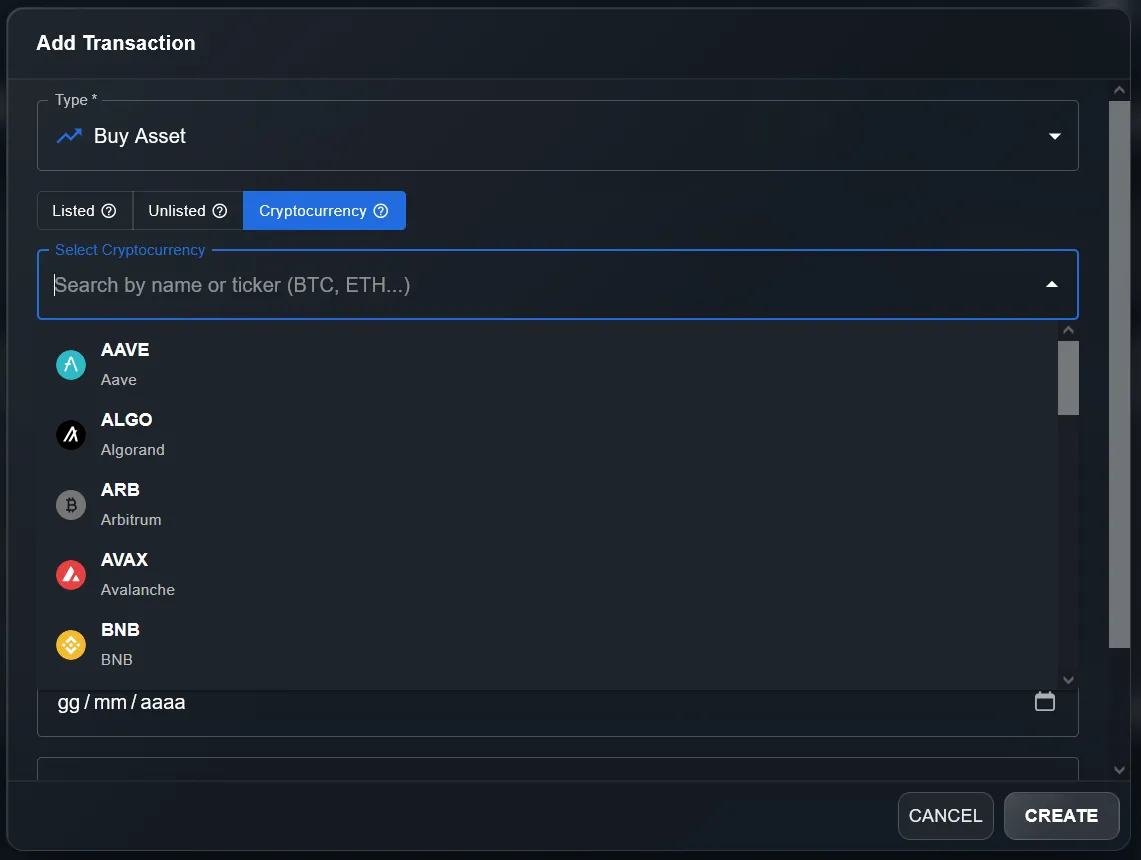
The Cryptocurrency tab in the Add Transaction modal shows the full catalogue. You can search for any crypto by name or ticker: BTC, ETH, BNB, AAVE, ALGO, ARB, AVAX and hundreds more.
💡 Tip
You can record any type of crypto transaction: buy, sell, staking reward (as Dividend), airdrop and transfers. Use the most appropriate type to keep your accounting accurate.
Step 2 — Crypto not found? Request it
DonkyCapital's crypto catalogue is extensive but not exhaustive. If you search for a crypto and don't find it in the list, the system shows a warning with the option to request its addition directly from the interface.
- 1Type the crypto name or ticker in the search field
- 2If not found, the yellow banner appears: "Cryptocurrency not found. You can request its addition."
- 3Click the "REQUEST CRYPTOCURRENCY" button on the right of the banner
- 4Submit the request: the team will evaluate its addition to the catalogue
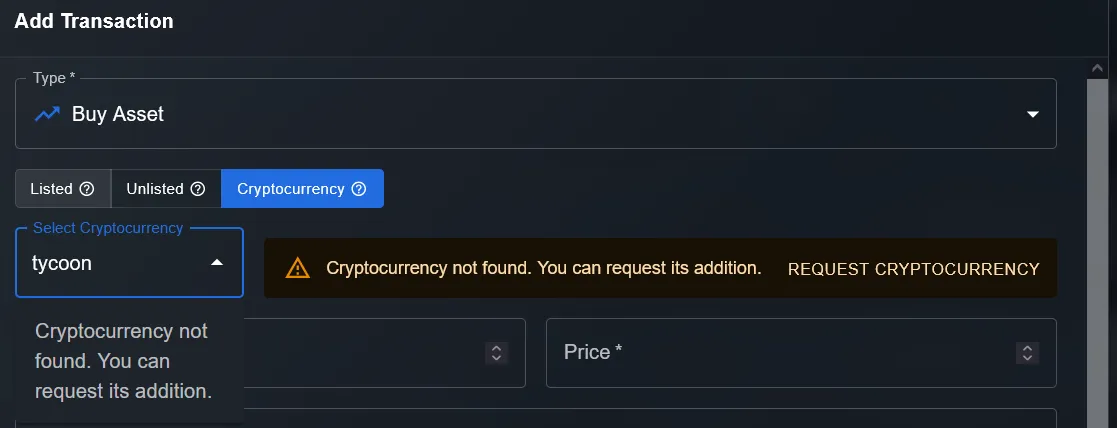
When a crypto isn't in the catalogue, DonkyCapital shows a banner with a button to request its addition. Alternatively, you can add it as an Unlisted Asset with manual price updates.
In the meantime, if you need to track a crypto not yet in the catalogue, you can use the "Unlisted Assets" feature to add it manually with periodic price updates.
Step 3 — View comparative performance
Once your crypto positions are entered, the "Portfolio Performance Chart" widget becomes your main tool for analysis. The chart shows the percentage performance of each asset over time on the same axis, enabling instant comparisons.
- →Each crypto (and each other portfolio asset) appears as a distinct coloured line
- →The Y axis shows the percentage change from the start of the selected period
- →You can choose time windows: 1D, 1W, 1M, 3M, 6M, YTD, 1Y, MAX
- →Switch between % and absolute value (€) with the toggle in the top right
- →The "Cash" line represents uninvested capital, useful as an opportunity cost reference
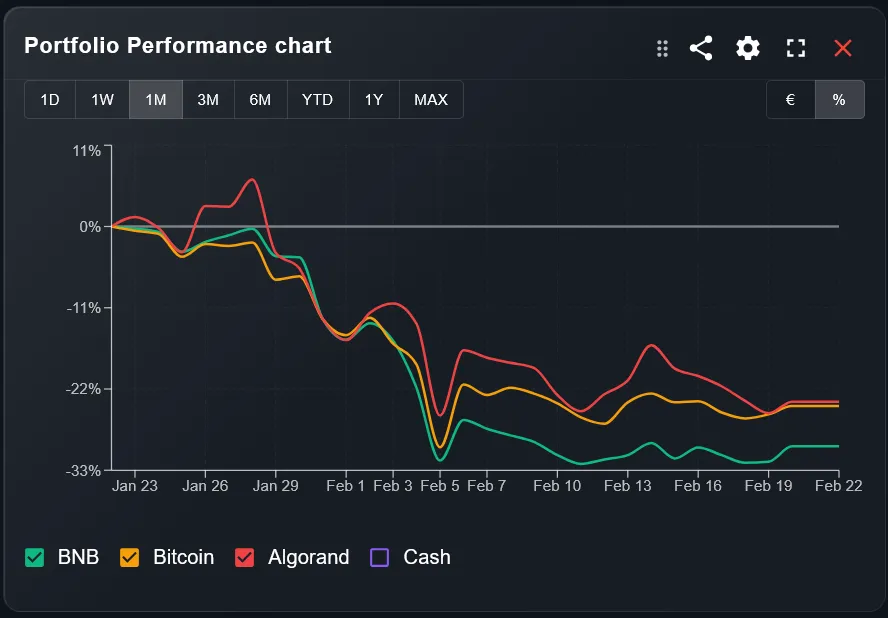
The Portfolio Performance Chart shows the percentage performance of each crypto in the same chart. In this 1-month example: BNB (green), Bitcoin (orange), Algorand (red) and Cash (purple) all start at 0% and diverge over time.
💡 Tip
Use the percentage (%) view to compare performance across different periods, even for assets with very different absolute values. Useful for identifying which crypto performed best in a given period.
Complete portfolio: crypto + stocks + unlisted assets
The real value of DonkyCapital emerges when all asset classes coexist in the same portfolio. You can freely combine:
Stocks & ETFs (Listed)
Exchange-listed instruments with real-time prices: stocks, ETFs, bonds
Cryptocurrencies (Cryptocurrency)
Bitcoin, Ethereum and hundreds of altcoins with automatically updated prices
Unlisted Assets (Unlisted)
Real estate, private equity, art, startups with manually updated prices
Single dashboard, consistent metrics, complete view of your wealth. No spreadsheets, no multiple apps, no scattered data.
Frequently Asked Questions
Are crypto prices updated automatically in DonkyCapital?+
Can I track crypto held in self-custody wallets?+
How do I record a staking reward or airdrop?+
Can I have multiple portfolios, one just for crypto?+
Do crypto assets affect portfolio allocation?+
Start tracking your crypto
Combine crypto, stocks, ETFs and unlisted assets in a single portfolio. With DonkyCapital you finally have a complete and consistent view of your entire wealth.
Try DonkyCapital